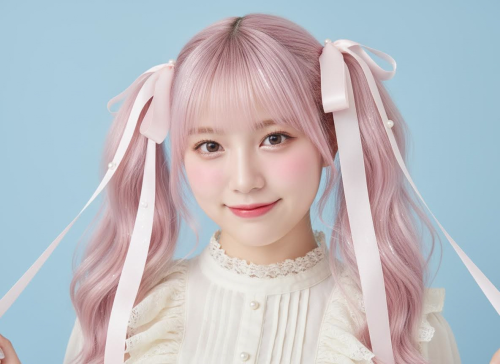
Hairstyle Idea Generator (Text-to-Image)

Hairstyle Idea Generatorfrom text

Describe a haircut in words and generate hairstyle inspiration images. Perfect for ideas, mood boards, and references — not photo editing.

  • Generate hairstyle concept images from text
  • Explore cuts, bangs, colors, and textures
  • Use results as references for salons or designers
Write a prompt
Be specific about the cut, bangs, and texture
Pick model, ratio, resolution
Control cost and tailor outputs for your use case
Generate and download
Iterate quickly until it matches your vision
0/10000
加载中...
nano-banana-v1-fast30 Credits
💡 Text-to-image only. Credits are deducted based on the selected model and settings

Result Gallery

Auto-saved

No Creation Yet

Please submit the form to begin your new creation.

My Creations

Why Choose Imagens.app for Hairstyle Ideas?

Imagens.app is a text-to-image Hairstyle Idea Generator: you describe a haircut in words and get hairstyle inspiration images back. It is built for brainstorming and references (mood boards, salon communication, character design), not for editing a real photo. Choose an AI model (such as nano-banana-pro), set aspect ratio and resolution, and generate consistent concept images you can iterate on quickly.

Text Prompt → Inspiration Images

From idea to image fast.

Text Prompt → Inspiration Images

Describe the cut, bangs, color, texture, and framing, then generate hairstyle concept images in one click.
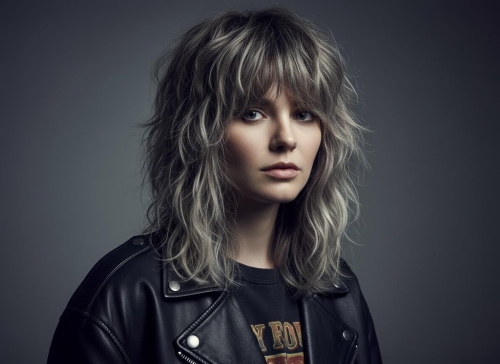
Model, Ratio, Resolution Control

Create the right format.

Model, Ratio, Resolution Control

Choose the AI model, aspect ratio, and resolution that match your use case—mood boards, social posts, banners, or character sheets.
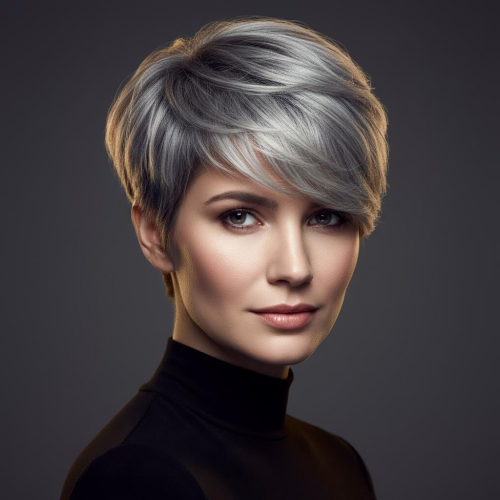
Credits Based, Pay for What You Use

Flexible pricing.

Credits Based, Pay for What You Use

Different models cost different credits, so you can balance quality, speed, and budget for each generation.

How to Generate Hairstyle Inspiration Images from Text

Three simple steps to create hairstyle concept images with text-to-image.

1

Write a Haircut Specification

Describe the haircut in concrete terms: length, shape, bangs, layers, color, texture, and framing (head-and-shoulders portrait).

2

Select Model + Aspect Ratio + Resolution

Pick an AI model (like nano-banana-pro), choose ratio (1:1, 3:4, 16:9, etc.) and a resolution for your target use.

3

Generate, Compare, Iterate

Generate a few variations, save the best references, then refine your specification for even closer results.
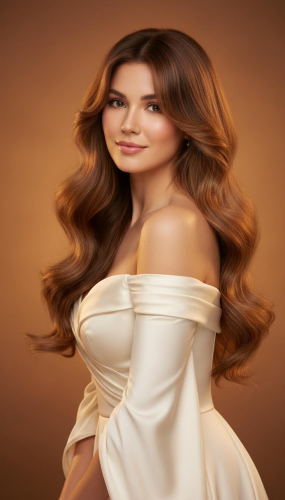
Create Your Sticker

About Imagens.app Hairstyle Idea Generator

Imagens.app helps you generate hairstyle inspiration images from text—no photo upload and no editing workflow on this page. It is designed for exploration: compare cuts, bangs, layers, and colors by writing clear haircut specifications and iterating. Choose an AI model (such as nano-banana-pro), set aspect ratio and resolution, and generate concept images that work well for mood boards, salon references, and creative projects.

Hair Detail Rendering

Focuses on hair detail: shine, strands, layers, and clean silhouettes.

Multiple Output Formats

Aspect ratio and resolution options for avatars, posts, banners, and covers.

Model Flexibility

Select the model that matches your desired style and budget.

Fast Iteration

Generate, tweak prompt, and regenerate until the hairstyle is exactly right.

Creator Friendly

Great for look planning, mood boards, and social content.

Key Features of Our Hairstyle Idea Generator

Built for fast text-to-image hairstyle exploration with controllable output and consistent quality.

Write Prompts Like a Haircut Specification

This page is pure text-to-image: you write the haircut you want and generate hairstyle inspiration images. For the best results, describe the haircut structure in concrete terms: hair length (chin-length, shoulder-length, long), shape (bob, wolf cut, layered shag), bangs (curtain bangs, blunt bangs, side-swept), and texture (silky straight, airy volume, soft curls). Add color (natural black, ash brown, platinum) and finish with framing and lighting (head-and-shoulders portrait, clean background, soft studio lighting). This level of detail helps the model follow your intent instead of producing generic outputs. It also reduces re-rolls, which saves credits and makes the tool feel worth paying for.
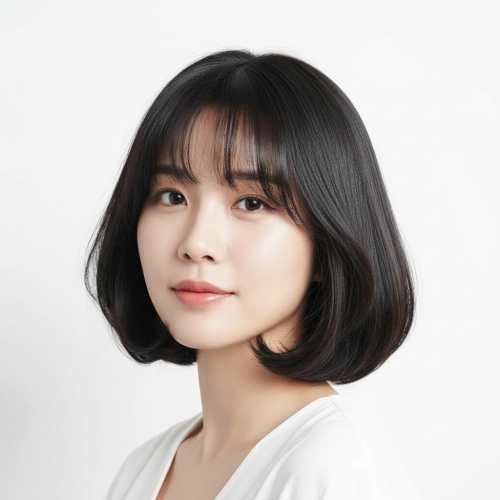
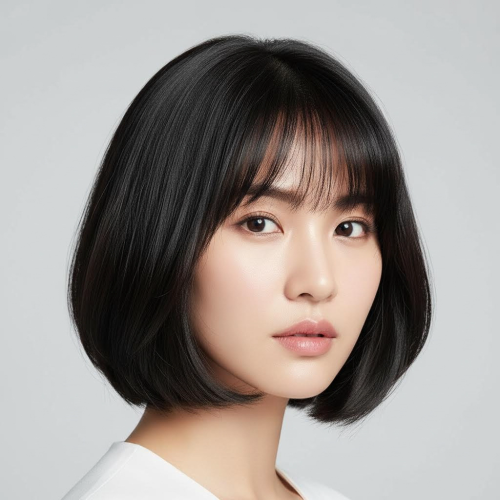
Write Prompts Like a Haircut Specification
Model + Ratio + Resolution Controls

Model + Ratio + Resolution Controls

Different models produce different hair realism, edge sharpness, and overall aesthetics. That is why this Hairstyle Idea Generator lets you choose the model first, then pick an aspect ratio and resolution that match your goal. Use 1:1 for avatars, 3:4 or 9:16 for vertical posts, and 16:9 for banners or wide mood boards. Higher resolution reveals more strand detail and cleaner edges, while lower settings are great for quick exploration. Credits are deducted based on the model you select, so you can iterate cheaply to lock the haircut direction, then switch to a higher-quality model and resolution for your final “final reference” image.

Performance for Fast Creation

Quick iterations so you can lock a hairstyle concept faster.

~ 30-60sGeneration Time
Model · Ratio · ResolutionControls
10k+Creators

Frequently Asked Questions

Common questions about generating hairstyle inspiration images from text.

What is a Hairstyle Idea Generator?
A Hairstyle Idea Generator creates hairstyle inspiration images from text. You describe the haircut (length, shape, bangs, layers), color, texture, and framing, then choose an AI model, an aspect ratio, and a resolution before clicking Generate. The output is a set of concept images meant for ideation, comparison, and references—not a personalized edit of a real photo. This is especially useful when you want to compare options quickly (bob vs. layered, bangs vs. no bangs) and share a clear visual direction with a stylist or a design team. Credits are deducted based on the model you select, so you can control budget and quality.
Is this a virtual try-on tool?
No. This page is text-to-image only: it generates hairstyle inspiration images from your written description. It does not edit a real photo, and it does not “swap your hair” onto your face. If your goal is to see how a haircut looks on you specifically, that requires a different workflow (image-based editing). Here, the best use is exploring haircut directions and collecting references: you can iterate on length, bangs, layers, color, and texture until the concept matches what you want. Then use the best image as a reference for a salon or a designer.
Can I upload my own photo?
Not on this page. The input is a text prompt, and the result is a generated concept image. If you want to keep the same person or use your own face as the base, that is an image-to-image feature and should live on a separate page to avoid confusion. For best results here, treat your prompt like a haircut specification: describe length, shape, bangs, layers, color, texture, and framing (head-and-shoulders portrait), then generate multiple variations. This gives you a reliable set of references without needing any upload flow.
What are these images best used for?
These results are best used as references and inspiration: haircut ideas, salon communication, mood boards, content planning, and even character design. They help you define what you mean by “short bob” or “soft layers” with a concrete visual example. If you are preparing for a haircut appointment, bring 2–4 generated references that match your desired length, bangs, and texture. If you are designing a character or brand look, keep the framing and lighting consistent and only change the haircut section to make fair comparisons across styles.
How do I write a prompt that matches the haircut I want?
Write prompts like a haircut specification. Include length (chin-length, shoulder-length), shape (bob, wolf cut, layered shag), bangs (curtain, blunt, side-swept), and texture (straight, wavy, soft curls). Add hair color and highlights, then lock the scene with clean background and soft studio lighting. If you want a realistic look, avoid mixing too many conflicting style words. If you want the hair to stand out, ask for head-and-shoulders framing and sharp focus on hair strands. Clear structure words reduce randomness and usually require fewer generations.
Which AI model should I choose (e.g., nano-banana-pro)?
Models differ in how they render hair strands, edges, lighting, and overall realism. A practical workflow is to start with a cost-effective model to test the haircut direction and prompt wording, then switch to a higher-quality model for your final reference images. If your goal is clean hair edges and fewer artifacts, pick the model that is known for higher fidelity in your UI. Because credits are deducted based on the model, this approach keeps your budget predictable while still letting you get premium-looking concept images when it matters.
Can I control aspect ratio and resolution?
Yes. Aspect ratio changes composition and how much of the hair appears in frame. Use 1:1 for avatars, 3:4 or 9:16 for vertical posts, and 16:9 for wide mood boards or headers. Resolution affects hair detail and clarity, especially for highlights and layered cuts. A good strategy is to generate at a moderate resolution to confirm the haircut shape and bangs, then increase resolution for the final reference image. This saves credits and time while still delivering a sharp, share-ready result.
How do I keep results consistent across multiple generations?
Keep your base prompt stable and change only the haircut section. Lock the rest of the scene with the same keywords: face description (generic), age range, clothing, camera framing (head and shoulders), background (plain/clean), and lighting (soft studio light). Then swap in bob, pixie, long layers, or other haircut descriptors while leaving everything else unchanged. Consistency improves when you avoid adding many new style adjectives every time. This method gives you fair comparisons where the main difference between images is the hairstyle direction.
Is it free? How does pricing work?
This tool is credit-based and not unlimited free. Each generation deducts credits based on the AI model you choose, and higher-quality models typically cost more. If you want to spend less, iterate with a cheaper model until your haircut specification is correct, then upgrade the model and resolution for a final reference image. This workflow is usually the most cost-effective because it reduces wasted generations. You stay in control: select the model that fits your budget, then decide how many variations you want to generate.
How can I get better hair detail (strands, shine, layers)?
Add hair-focused detail words: high detail hair strands, glossy highlights, layered haircut, clean silhouette, sharp focus, rim light, and soft studio lighting. Keep the background clean so hair edges render clearly, and avoid mixing too many different styles in one prompt. If results look muddy, increase resolution and reduce style clutter. Also specify hair texture and volume (silky straight vs. airy volume) because it guides strand rendering. When you are close to the look you want, upgrade the model for the final pass to get cleaner edges and better highlights.

Still have questions? Contact us at resend0@foxmail.com

User Reviews

What creators are saying about our Hairstyle Idea Generator.

"Once I specified bangs and layers, results became consistent. Hair detail looks premium."

Mina Sato
Illustrator

"Perfect for fast haircut idea boards. Vertical ratios fit social covers instantly."

Kevin Wu
Content Creator

"Cheap model to explore, better model to finalize. Great cost-performance workflow."

Hana Lee
Cosplay Stylist

"Model and resolution controls save me from extra cropping. Very practical."

Daniel Park
Product Manager

"Iterating hairstyle directions on the same concept is fast. Decisions are easier for the team."

Ari Chen
VTuber Producer

"Wolf cut with glossy highlights prompts are followed well. Layers look convincing."

Luca Rossi
Comic Artist

"Great for mood boards. Consistent look makes communication with clients faster."

Sophia Brown
Brand Designer

"I was nervous about cutting short hair. Comparing reference images helped me decide."

Yuki Tanaka
Student

"Once I specified bangs and layers, results became consistent. Hair detail looks premium."

Mina Sato
Illustrator

"Perfect for fast haircut idea boards. Vertical ratios fit social covers instantly."

Kevin Wu
Content Creator

"Cheap model to explore, better model to finalize. Great cost-performance workflow."

Hana Lee
Cosplay Stylist

"Model and resolution controls save me from extra cropping. Very practical."

Daniel Park
Product Manager

"Iterating hairstyle directions on the same concept is fast. Decisions are easier for the team."

Ari Chen
VTuber Producer

"Wolf cut with glossy highlights prompts are followed well. Layers look convincing."

Luca Rossi
Comic Artist

"Great for mood boards. Consistent look makes communication with clients faster."

Sophia Brown
Brand Designer

"I was nervous about cutting short hair. Comparing reference images helped me decide."

Yuki Tanaka
Student

"Highlights stay clean instead of muddy. Hair edges are surprisingly sharp."

Ethan Miller
Retouch Artist

"Easy to generate multiple cover options for A/B tests. Fast and reliable."

Nora Kim
Social Media Manager

"I use it to lock the silhouette before modeling. It reduces a lot of trial and error."

Chen Hao
3D Artist

"The more specific the hair color and texture, the more usable the images become."
Ivy Zhang
E-commerce Owner

"Simple flow: prompt, model, generate. It is ideal for quick visual exploration."

Marco Silva
UI Designer

"Curtain bangs plus collarbone length worked on the first generation. Worth paying for."

Grace Liu
Hairstyle Enthusiast

"Credit usage is clear and predictable. Iterating does not feel risky."

Noah Davis
Indie Developer

"Highlights stay clean instead of muddy. Hair edges are surprisingly sharp."

Ethan Miller
Retouch Artist

"Easy to generate multiple cover options for A/B tests. Fast and reliable."

Nora Kim
Social Media Manager

"I use it to lock the silhouette before modeling. It reduces a lot of trial and error."

Chen Hao
3D Artist

"The more specific the hair color and texture, the more usable the images become."

Ivy Zhang
E-commerce Owner

"Simple flow: prompt, model, generate. It is ideal for quick visual exploration."

Marco Silva
UI Designer

"Curtain bangs plus collarbone length worked on the first generation. Worth paying for."

Grace Liu
Hairstyle Enthusiast

"Credit usage is clear and predictable. Iterating does not feel risky."

Noah Davis
Indie Developer
✨ New Ideas in Seconds

GenerateHairstyle Inspiration Images

Describe a haircut in words and generate text-to-image hairstyle references—fast, controllable, and credit-based.

Text-to-image only · Model-based credits · Ratio & resolution control